 createbooth
A compatible charger or USB-C PD power bank, a suitable cable and a stable stand.
Start charged and use a suitable supply
Charge the iPad beforehand. Use a compatible, reputable power supply and cable. For USB-C equipment, check the charger or power bank supports USB Power Delivery; capacity alone does not tell you its output power.
Test while the booth is actually running
Run the camera, screen and any connected accessories for at least 30 minutes. Check the battery level at the start and end. A charging icon does not guarantee the supply keeps up with the load.
Make the installation comfortable
Keep the iPad ventilated and out of direct sunlight. Set a readable screen brightness and secure cables so guests cannot pull the stand over. Keep power equipment away from drinks.
Plan for accessories
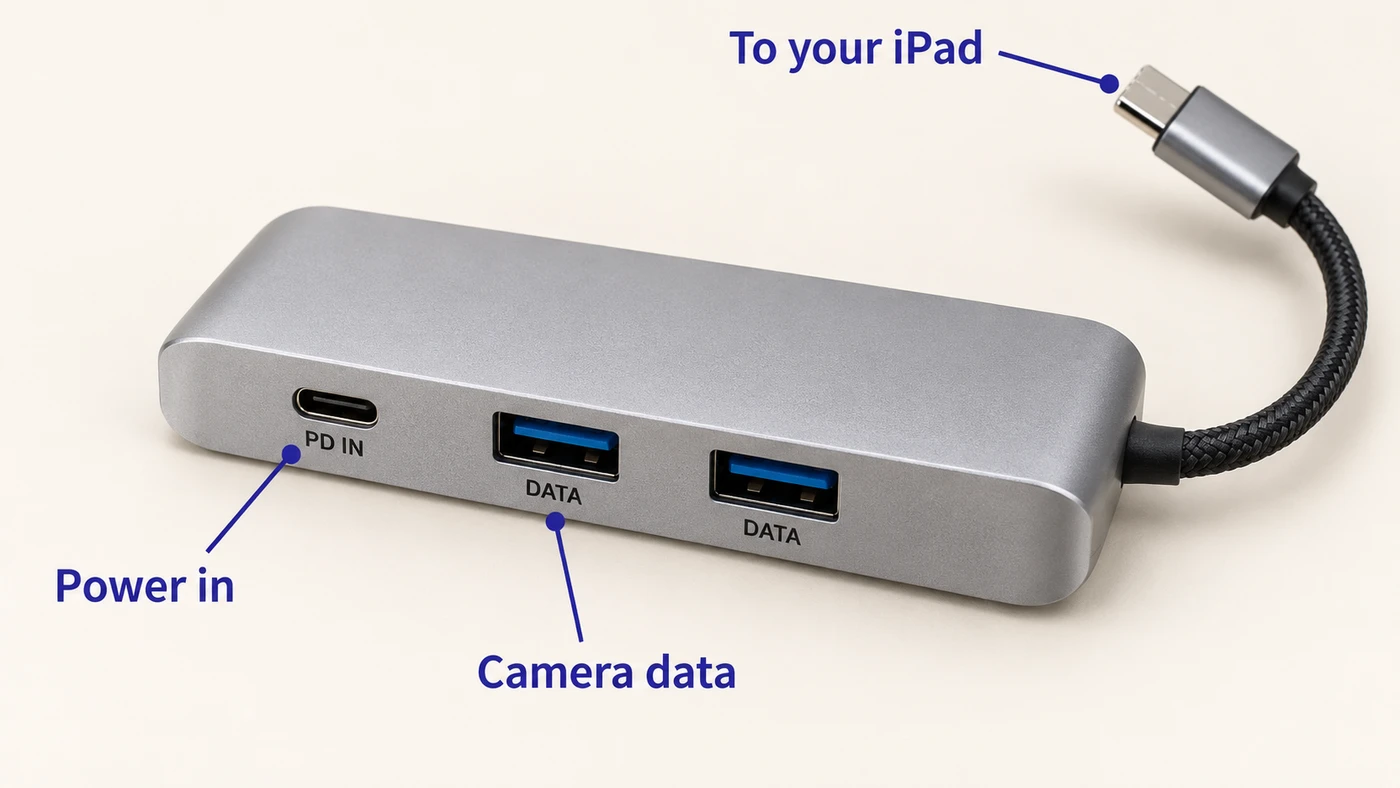
If the iPad port is needed for a camera, use a compatible hub with a dedicated power-input port and a separate data port. Follow the camera-and-power guide below. Avoid unverified splitters that only duplicate charging connections.
Check again during the event
Recheck battery and temperature between groups. Pause before swapping a cable or power bank; some hubs reset their data connection when power changes. Re-test the camera after reconnecting.
Real app screens with numbered highlights. Tap Enlarge to inspect a screen. Example content; labels can vary by app version.
Helpful to know.
How long will a power bank last?
There is no reliable universal guest count or runtime. It depends on the iPad, brightness, camera, hub and battery condition. Test your exact setup.
Lightning iPad?
Use an accessory explicitly compatible with your model. USB-C hub diagrams do not apply directly to Lightning ports.
Official instructions
Check the guide for your exact device and software version.
Apple: USB-C charging and accessories ↗